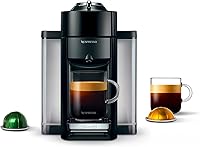
How to Reset a Nespresso Vertuo Pop
Press the button 5 times within 3 seconds to start a factory reset, then wait for the machine to power off and back on. If the orange light is the issue, a descaling reset usually clears it faster than a full reset.
On this page (9 sections)
- What does resetting a Vertuo Pop actually do?
- How to reset a Nespresso Vertuo Pop machine step by step
- When should you use the descaling reset instead?
- How do you reset the Vertuo Pop after descaling?
- Do you need to reset a brand-new Vertuo Pop?
- How do you reconnect Wi-Fi after a reset?
- Which Vertuo Pop model are you resetting?
- What should you do if the reset doesn't fix the problem?
- The short version
Here's how to reset a Nespresso Vertuo Pop machine: press the button 5 times within 3 seconds, wait for the power light to blink, then let the machine switch off and restart. A full factory reset clears saved settings and Wi-Fi, while the shorter descaling reset clears the orange light without wiping everything.
Knowing which reset you need saves time. Most people reach for the full reset when the light won't behave, but a Vertuo Pop usually needs the descale sequence first.
The steps below cover both, in order, so you can stop as soon as the machine behaves.
What does resetting a Vertuo Pop actually do?
A reset returns the machine to its default brew and light states, not to a repaired one. It clears saved Wi-Fi, restores default cup settings and restarts the brew sequence, so odd light patterns and stuck cycles often clear.
The Vertuo Pop+ reads each capsule's code and adjusts brew settings for it. A reset doesn't change that, because the code sits on the capsule, not in memory.
What it does change is the saved network and any custom behaviour the machine picked up while connected.
The reset doesn't descale the machine, empty the water tank or fix a blocked needle. If the light is orange rather than a normal brew colour, skip to the descaling section first.
The full reset is the last step, not the first.
How to reset a Nespresso Vertuo Pop machine step by step
Start with the machine switched on and the head closed with no capsule inside. The sequence is short, but the timing matters, so read it once before you start pressing.
- Turn the machine on and wait for the steady brew light.
- Press the button 5 times within 3 seconds.
- Watch the light blink to confirm the sequence started.
- Wait while the machine powers down on its own.
- Switch it back on and let it run its start-up cycle.
- Reconnect Wi-Fi in the app if you want app control back.
Don't press during the blink phase. The Vertuo Pop+ uses its single button for brewing, descaling and reset, and extra presses can interrupt the cycle.
If the light stays solid and nothing happens, unplug for about 10 seconds and try again from step one.
Which light pattern means what?
The button colour tells you which reset to run. A steady brew colour means normal, an orange light means descale, and a fast blink during a reset means wait.
On the Vertuo Pop+, a solid orange light is the descaling alert. A blinking light during the 5-press sequence confirms the reset is running.
A red light usually points to a fault such as a closed head or a missing tank.
Match the light before you press. Running a factory reset when the machine only wants a descale means you lose your Wi-Fi setup for nothing.
The reverse also wastes time: a descale won't clear a stuck start-up cycle.
When should you use the descaling reset instead?
Use the descaling sequence when the orange light stays on after you've brewed normally. That light is a reminder, and it only clears when the full descale cycle finishes.
Nespresso machines build up limescale inside the brew path, and the Vertuo Pop+ tracks how much water has passed through. The orange light switches on when the counter hits its limit.
Pressing buttons in a different order won't clear it.
Our walkthrough on how to descale a Nespresso Vertuo Pop machine covers the full cycle, including the tank fill, the solution dose and the rinse. Run that first.
If the light still won't clear, then run the factory reset.
Nespresso's kit fits all models and comes with 2 packets. The packet size suits the Vertuo Pop+ tank, so you mix one dose per descale.
Keep the cloth for wiping the head area afterward.
How do you reset the Vertuo Pop after descaling?
The machine runs its own rinse sequence after descaling, and a full reset is only needed if the light stays on. Finish the descale, let the rinse water run through, then check the light.
If the orange light persists after a complete cycle, run the 5-press factory reset. Some machines also need the tank refilled with fresh water before the reset will start.
Use cold water from the tap, not filtered water from a pitcher that's been sitting.
Don't run a second descale straight away. Two cycles back to back waste solution and don't speed anything up.
One full cycle, then the reset, is the sequence Nespresso describes for this machine.
How do you reset the water level or "empty tank" state?
Refill the tank and press the button once to clear the low-water stop. The Vertuo Pop+ won't brew with a low tank, and the light stays on until water is added.
The 25.4 fl oz tank on the Pop+ sits on the side and lifts off for refilling. Fill it to the line, seat it firmly, and the machine should return to the brew light.
If it doesn't, the tank may not be seated all the way down.
Do you need to reset a brand-new Vertuo Pop?
No. A new Vertuo Pop+ is already at factory settings, so it only needs its first rinse and a Wi-Fi connection if you want app features.
The first-run routine is a rinse cycle with no capsule. Fill the tank, close the head, and press the button once.
The machine heats in about 30 seconds and runs water through. After that it's ready for your first capsule.
Don't run a factory reset on a new machine to "set it up". It won't speed the process and clears the network pairing you just made.
Save the reset for when the light or the brew cycle actually misbehaves.
How do you reconnect Wi-Fi after a reset?
Open the Nespresso app and add the machine again as if it were new. The factory reset wipes the saved network, so the old connection won't come back on its own.
The Vertuo Pop+ connects over Wi-Fi, and once paired it updates its own software. That's how it stays current without you doing anything.
After a reset, the machine shows up in the app as an unpaired device.
Keep the phone close to the machine during pairing. If the connection fails twice, restart the app and try once more before you unplug anything.
A reset you didn't intend also clears the pairing, so check the light sequence before you press.
Which Vertuo Pop model are you resetting?
The 5-press reset works the same way on both the Vertuo Pop+ and the Pop+ Deluxe, because both use a single control button. The main difference is what's in the box and the tank size.
The Vertuo Pop+ has a 25.4 fl oz removable tank on the side and brews 5 cup sizes, including coffee and espresso hot or over ice. It heats in about 30 seconds.
The Deluxe version has a larger 37.2 fl oz tank and includes a milk frother for hot or cold foam where applicable.
If your machine has a different button layout, it's not a Pop+. Check the model name on the base before following these steps.
The classic Vertuo and Vertuo Next have their own sequences.
If you're comparing models before you buy, our look at Nespresso Vertuo vs Vertuo Next covers how the controls differ. For iced drinks, see the best Nespresso machine for iced coffee.
And if you're wondering whether other capsules fit, read can a Nespresso Vertuo use original pods.
What should you do if the reset doesn't fix the problem?
Unplug the machine, wait about 10 seconds, plug it in and repeat the sequence once. A soft power cycle clears more stuck states than repeated button presses.
If the light still won't behave, work through the causes in order. A tank that isn't seated, a head that isn't fully closed or a capsule stuck in the holder can all keep the machine from starting.
Clear those before you reset again.
Don't open the head while the machine is running its cycle. Let it finish, then check the capsule holder for a missed capsule.
A stray capsule keeps the machine from reaching its ready state and looks like a reset failure.
If the orange light survives a full descale and a factory reset, the machine likely needs service. Contact Nespresso support rather than running more cycles.
Repeated descaling won't fix a fault, and it costs you solution each time.
The short version
To reset a Nespresso Vertuo Pop machine, start with the light. Orange means descale first, odd behaviour means run the 5-press factory reset.
Only run the full reset when the descale cycle hasn't cleared the light or the brew cycle is stuck.
Pick the descaling kit for the orange light, and keep the reset sequence for everything else. The Pop+ and Pop+ Deluxe both take the same 5 presses, so the steps work on either model.
When the reset clears the light, brew a cup and confirm the coffee still tastes right before you reconnect Wi-Fi.
Frequently asked questions
How long does a Vertuo Pop reset take?
The factory reset itself takes a few seconds once you start it. The machine then powers off and restarts, so allow a minute or two before brewing your first cup.
Will resetting the Vertuo Pop delete my Wi-Fi setup?
Yes. A factory reset clears the saved network, so you'll need to reconnect the machine through the Nespresso app afterward if you want app control and automatic updates.
Can I reset the machine without the app?
Yes. The button sequence works on the machine itself.
The app is only needed to reconnect Wi-Fi and to view the connected maintenance steps after the reset.
What should I do if the reset sequence doesn't work?
Unplug the machine for about 10 seconds, plug it back in, and repeat the button sequence. If the light stays orange after a full reset and a descale, contact Nespresso support.