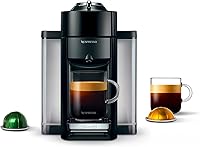
How to Reset a Nespresso Vertuo Plus
Turn the machine off and unplug it for 10 seconds, then plug it back in and press the button five times within three seconds. A Vertuo Plus resets when the button blinks orange, then turns steady. Unplugging clears most lockups before you try that sequence.
On this page (11 sections)
- When should you reset a Nespresso Vertuo Plus?
- What does the reset sequence actually do?
- How to reset a Nespresso Vertuo Plus machine step by step
- What should you check before you start the reset?
- Why won't the reset sequence work?
- What does the orange light mean after a reset?
- How do you run the descaling cycle the reset points to?
- Is a reset the same as descaling a Vertuo Plus?
- What should you do if the reset doesn't fix the problem?
- Which machine should you look at if you're replacing it?
- The bottom line on resetting a Vertuo Plus
Here's how to reset a Nespresso Vertuo Plus machine: power it off, unplug it for about 10 seconds, plug it back in, then press the button five times within three seconds. The button blinks orange and then holds steady when the reset takes.
That clears most frozen brew cycles and odd light patterns. If the orange descaling light comes back after the reset, the machine still wants a descaling cycle, and no reset will remove the limescale for you.
When should you reset a Nespresso Vertuo Plus?
Reset when the machine stops mid-brew, blinks in a pattern that doesn't match the manual, or won't start a normal cup. A reset returns the machine to its factory defaults, so it clears a stuck process before you assume the machine has failed.
Common triggers include a capsule that didn't pierce cleanly, a brew head left open, or a power dip that scrambled the electronics. The Vertuo Plus runs a Centrifusion brew cycle, and an interrupted cycle can leave the button in a state that ignores further presses.
The reset is also the step before descaling when the orange light is on. It doesn't replace descaling, but it gives you a clean starting point so the next cycle runs properly.
If the machine is brand new and the button won't respond, check that the water tank is seated and the head is fully closed before resetting.
What does the reset sequence actually do?
The five-press sequence tells the machine to clear its stored settings and return to factory defaults. The orange blink confirms the command was received, and the steady light means it finished.
This is a settings reset, not a cleaning cycle. It won't descale the machine, flush the brew path, or fix a blocked capsule needle.
Think of it as a soft reboot for the electronics.
The button press count matters. Five presses within three seconds is the trigger; slower presses read as normal start commands and won't reset anything.
If the light doesn't blink orange, repeat the sequence a little faster.
How to reset a Nespresso Vertuo Plus machine step by step
Power off, unplug, wait, plug in, then press five times. Follow the order below and watch the button for the orange blink.
- Lift the head and let any capsule drop into the used capsule bin.
- Press the button to turn the machine off and confirm the light goes out.
- Unplug the power cord and wait about 10 seconds.
- Plug the cord back in and press the button to turn the machine on.
- Within three seconds of the light coming on, press the button five times in a row.
- Watch for the orange blink, then wait for the steady light that shows the reset finished.
If the light never blinks, turn the machine off and repeat steps 2 to 5. A press that lands too late resets the count and you start over.
What should you check before you start the reset?
Check the water tank, the capsule bin, and the brew head before resetting. A reset won't fix a physical blockage, and you'll just repeat the sequence without solving the real problem.
Empty the used capsule bin so nothing is jammed under the head. Seat the water tank fully and make sure the level is above the minimum mark.
Close the head until it clicks. If a capsule is stuck in the chamber, remove it before you press anything.
Which descaling kit should you keep on hand?
Keep the Nespresso Descaling Kit Solution on hand so a reset that reveals the orange light doesn't leave you waiting on a delivery. It ships as 2 packets with a cleaning cloth, and the maker says it's formulated for Nespresso machines across all models.
The kit is simple to use: mix a packet with water in the tank and run the descaling cycle. Skip it if your machine came with a descaling kit still in the box.
Pick this up when the packet is used or missing and the orange light won't clear after a reset.
Why won't the reset sequence work?
The sequence usually fails because the presses are too slow or the machine wasn't fully off first. Both are easy to fix, and neither means the machine is broken.
Try these in order:
- Press the button five times faster, within the three-second window after the light comes on.
- Hold the power press until the light actually goes out, not just dims.
- Unplug for a full 10 seconds rather than a quick pull and replug.
- Check that the head is closed and the tank is seated before turning on.
If the button still won't respond, the machine may be stuck in a descaling lock. In that case, run the descaling cycle and reset again when it finishes.
A machine that won't power on at all needs a different check: the outlet, the cord, and the plug seating.
What does the orange light mean after a reset?
A steady orange light after the reset is normal; a blinking orange light usually means the machine still wants a descaling cycle. The two look similar, so watch whether the light pulses or holds.
If it keeps blinking instead of settling to a steady light, the descaling counter may have tripped. A reset clears settings but doesn't reset the limescale inside.
Run a full descaling cycle with the kit, then follow the machine's rinse step.
If the light stays orange and the machine brews normally, you're done. If the light flashes in a pattern the manual doesn't explain, note the count of flashes before you call support.
That count tells the service team which fault the machine is reporting.
How do you run the descaling cycle the reset points to?
Fill the tank with descaling solution and water, start the descaling mode, and let the machine run the full cycle. The reset only clears settings, so the descaling step is what actually removes the limescale.
Follow the machine's descaling instructions for the exact button presses. The cycle usually takes a few minutes and includes a rinse phase with clean water.
Don't skip the rinse. Descaling solution left in the brew path will taint the next cup.
Run a plain water cycle after descaling, then brew a test cup and taste it before you trust the machine again.
When the cycle finishes and the light clears, reset once more so the machine starts clean.
Is a reset the same as descaling a Vertuo Plus?
No. A reset clears settings and stuck processes, while descaling removes limescale from the brew path.
They solve different problems, and the orange light is the cue that tells you which one you need.
A reset won't change the water hardness or the limescale buildup. Descaling won't fix a frozen brew cycle or a scrambled button state.
If the machine brews but tastes flat or runs slow, descale first; if it won't start or blinks oddly, reset first.
Run descaling on the schedule your water hardness calls for. Hard water builds scale faster, so a machine on hard water needs the cycle more often than one on soft water.
What should you do if the reset doesn't fix the problem?
If the reset and a descaling cycle both fail, the fault is likely mechanical or electrical, and support is the next step. A reset can't repair a failed pump, a blocked needle, or a bad heating element.
Before you call, note what the machine does: the light pattern, whether it heats, whether water flows, and whether the capsule pierces. That detail speeds up the diagnosis.
A kinked cord, a loose tank, or a capsule stuck in the head can mimic a bigger failure, so clear those first and reset again.
If the machine is still under warranty, contact Nespresso support rather than opening the casing. For broader reset steps across models, see how do I reset my Nespresso machine for the sequences that fit other machines.
Which machine should you look at if you're replacing it?
If the reset won't revive your Vertuo Plus, the Vertuo Pop+ is the compact replacement to compare first. It keeps the one-touch Vertuo brew and adds a smaller footprint for tight counters.
The Pop+ brews 5, 8, and 12 oz coffees plus single and double espressos, hot or over ice. Its removable 25 fl oz tank sits on the side, and the maker lists a 30-second heat-up and a descaling alert.
If you want milk drinks built in, the Vertuo Lattissima adds a detachable 16 fl oz milk tank for one-touch cappuccinos and lattes. It brews six sizes, including 18 oz coffee, and the milk tank is dishwasher safe.
Both machines take only Vertuo capsules. If you're weighing the switch, read can Nespresso Vertuo use original pods before you stock up.
For hot-weather brewing, our pick of the best Nespresso machine for iced coffee covers the models that handle cold cups well. And if you're deciding between the classic body style and the newer Next, Nespresso Vertuo vs Vertuo Next lays out the differences.
The bottom line on resetting a Vertuo Plus
Reset a Nespresso Vertuo Plus by unplugging it for 10 seconds and pressing the button five times within three seconds after it powers back on. The orange blink confirms it worked, and a steady light means you can brew again.
Try the reset first for a stuck brew or odd light. If the orange descaling light returns, run a full descaling cycle with the Nespresso kit and reset once more when it finishes.
Keep the machine's water tank seated and the capsule bin clear, and most lockups won't need a reset at all. When a reset and a descale both fail, contact support with the light pattern in hand rather than opening the casing.
Frequently asked questions
How long should a Vertuo Plus stay unplugged during a reset?
Leave it unplugged for about 10 seconds. That short pause lets the internal electronics clear, and it is enough for most lockups without waiting longer.
Will a reset erase my saved settings?
A standard reset returns the machine to its factory defaults, so any adjusted brew settings go back to how it shipped. It does not remove the machine's need for regular descaling, which you still handle separately.
Can I reset the machine while a capsule is still inside?
No. Open the head and let any capsule drop into the bin before you start.
A capsule left in the brew chamber can jam the mechanism when the machine restarts.
Do I need to descale right after resetting?
Only if the orange descaling light was on before the reset. A reset does not remove limescale, so if the light returns, run a full descaling cycle with a kit made for Nespresso machines.